CubeMaster Fulfillment in Action
Preview the actual warehouse execution screens designed for touchscreens, tablets, and desktop workstations.
Live 3-Panel Warehouse Workspace
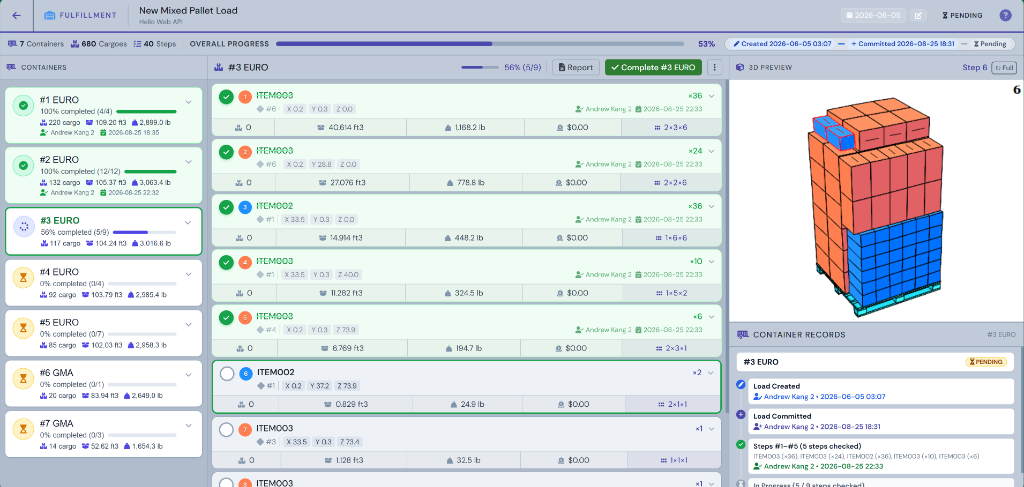
Synchronized 3-Panel View: The left container selector shows real-time container packing progress (100% completed, 56% in-progress), the center checklist guides floor operators step-by-step with cargo group codes, XYZ coordinates, piece counts, and individual progress checkmarks, while the right panel renders the interactive 3D container graphics and audit history.
Operations Dashboard
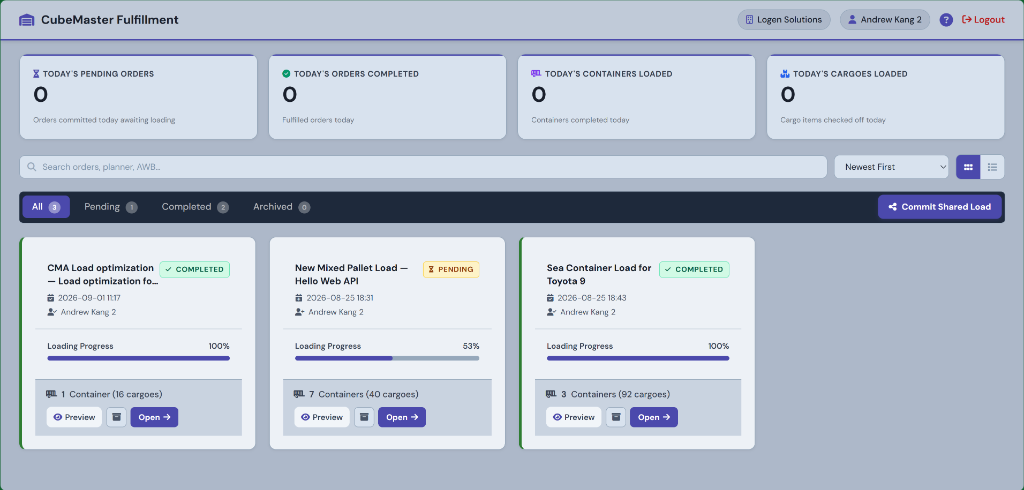
Instant visibility over today's pending and completed loads, container counts, cargo pieces, status badges, and one-click shared load commit.
Loading Report & Timelines
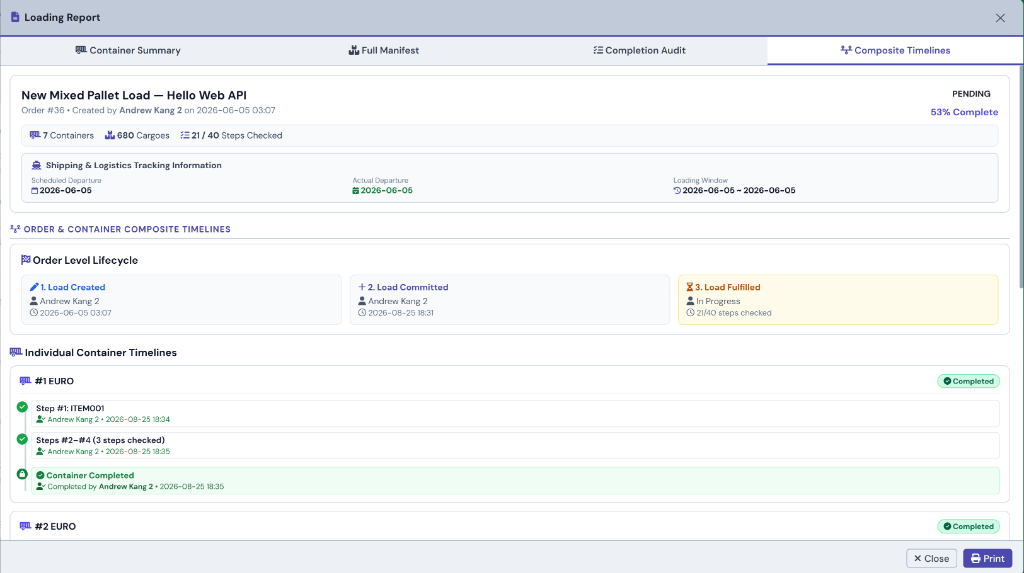
Professional 4-tab report suite with Container Summary, Full Manifest, Completion Audit, and Composite Timelines tracking order lifecycles and container timestamps.
How Load Fulfillment Works
Four easy steps to guide floor crews from calculated load plans to completed shipments with zero hardware setup.
Select & Dispatch
Logistics planners send load plans directly from CubeMaster, or supervisors pick shared company orders from the dashboard queue.
Open Packing Screen
Warehouse crews view active containers, cargo checklists, and rotatable 3D packing graphics on any web browser.
Load Cargo Step-by-Step
Floor workers follow clear placement directions, coordinates, and arrangement rules, checking off items as they pack.
Complete & Export Reports
Mark containers complete, log worker timestamps automatically, and print or download PDF loading manifests.
Clear Workflow & Execution Highlights
The Fulfillment Portal connects desktop load calculations directly to floor workers. It gives your team clear visual packing guides on PCs, laptops, or tablets without requiring expensive hardware or dedicated barcode scanners.
1. Easy Load Dispatching
Send calculated load plans to the fulfillment queue with one click. When shipments finish, load templates automatically unlock for repeat orders.
2. Clear 3-Panel Display
Keep dock crews organized: Containers list on the left, interactive cargo checklist in the middle, and rotatable 3D container graphics on the right.
3. Instant Manifest Reports
Generate clean summary reports, itemized manifests, and operator completion history anytime you need to review or print.
4. Works on Any Device
Runs 100% in standard web browsers on laptops, PCs, or tablets. No handheld barcode scanners or special equipment required.
Role-Based Authorization Matrix
Configurable control policies for warehouse floor operators versus dock supervisors.
| Portal Feature & Action | Normal Operator Role | Supervisor & Admin Role |
|---|---|---|
| View Dashboard & Active Orders List | Allowed | Allowed |
| Check / Uncheck Cargo Steps | Allowed | Allowed |
| Complete Single Container (#X) | Allowed | Allowed |
| Bulk Complete All Containers | Restricted | Allowed |
| Reset Container #X (Revert to Pending) | Restricted | Allowed |
| Reset Whole Order & Archive Orders | Restricted | Allowed |
| Edit Live Shipping & Milestone Dates | Allowed | Allowed |
Measured Warehouse Throughput & Accuracy
CubeMaster Fulfillment Portal optimizes dock productivity by delivering clear step-by-step loading maps directly to floor crews.
100%
Packing Accuracy
Step-by-step verification
35%
Faster Dock Loading
Clear 3D maps & checklists
Real-Time
Audit Trail
Operator timestamp logging
$0
Scanner Hardware Cost
100% Web browser native